NOTES
An introduction to memory hacking with ArtMoney
One of the many things I'm asked regularly is how to obtain useful data from games using ArtMoney. So I will be covering many of the tricks I use while making a table from scratch.
For those of you who are not familiar with ArtMoney, I should probably point you to my previous article, "Obtaining data from the KOF series of games using ArtMoney". Basically, ArtMoney is a tool that allows you to read and write the memory of any program you wish: from Minesweeper to the latest fake Xbox emulator, you can use it to poke around in memory and do all kinds of cool things. This is why it's usually used for cheating. :P
You are probably asking yourself why we would need such a thing, or whether it's useful at all when most emulators today can disable sprite layers and show us the axes of whatever we are working with. Getting a velocity would be as easy as counting the pixels, right?
Well... no. Ever since the Street Fighter II era most fighting games use special friction calculations to make the game feel better and more natural. MUGEN does this all the time, too!
And while all the old methods did in fact rely on obtaining position data (such as the good old VelCalc method), the results were never quite the same, and in some cases, data ended up being lost! In fact, some KOF characters only used posadds to define their movement just to be as accurate as possible to the original game. Times sure have changed!
Velocities aside, more complicated games such as Street Fighter III have more subtle changes during gameplay that are best observed using a memory editor. For example, if you have Third Strike nearby, I recommend trying this: pick a character (I personally recommend Dudley, or Yun) and then use all their normal moves. Notice something funny? If not, I'll give you a hint: the shadows!
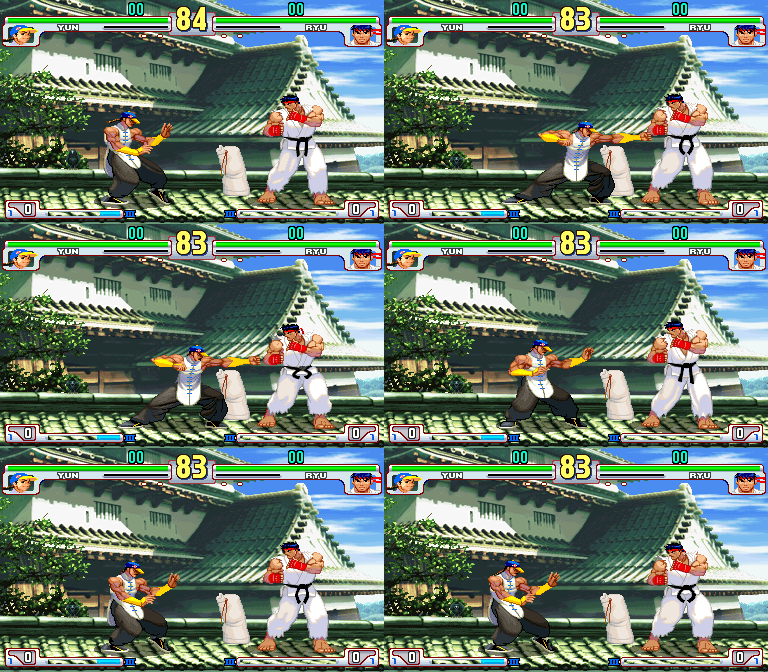
In Third Strike, almost every move in the game makes the character move very, very slightly in order to make the animations look better. Games such as KOF had already done this in the past, but Street Fighter III just takes it to a whole new level. This is also the very foundation of the kara-throw technique, an important aspect of competitive Street Fighter. This is the type of data that can only be reliably obtained with a memory editor.
After using ArtMoney for years on almost every fighting game out there (and a couple of shooters and maaaaaybe one or two RPGs, just for fun), I have noticed certain trends and patterns that make hacking much easier than starting all over from zero. I will try to cover most of my good tricks in this guide.
Before we proceed, some general advice and recommendations:
- The first value to obtain is never the timer! I know there's another guide out there that mentioned syncing with a timer, but this is not reliable at all. I've encountered timers with up to 100 different addresses with the same data, and some games that don't even use a static timer AT ALL (!)
- Most modern games keep the player data all together in memory blocks. This means that almost all useful data for a player is contained close together in a small set of addresses.
- DON'T PANIC, DON'T GIVE UP. Working directly with the memory is tough and tiring, but patience WILL help you get what you want faster and more precisely.
- And most importantly SAVE YOUR WORK! I seriously cannot stress this enough, I've lost over 20 tables because I didn't save often. Do it.
Meet ArtMoney
Now, we must know our enemy... or... tool in this case. Behold, meet ArtMoney:
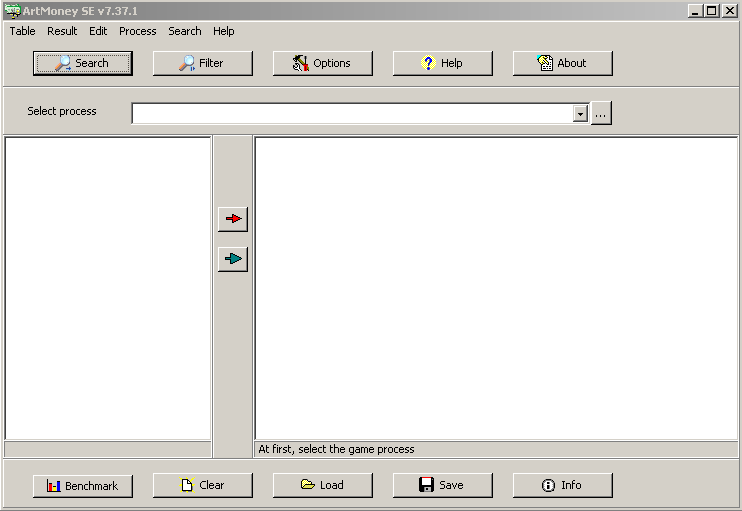
All that needs to be done to start using ArtMoney is to select a game (or emulator) process and start using the "Search" and "Filter" options to obtain a "table" of addresses containing the data we want.
First up, let's configure ArtMoney properly, alright?
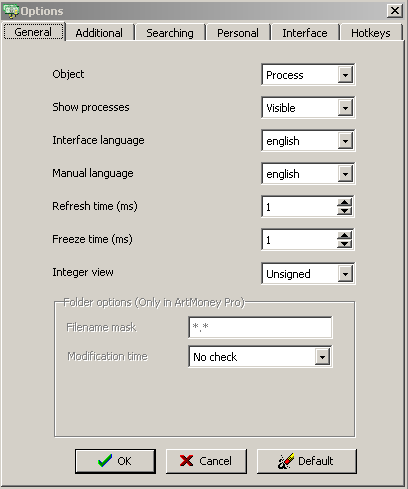
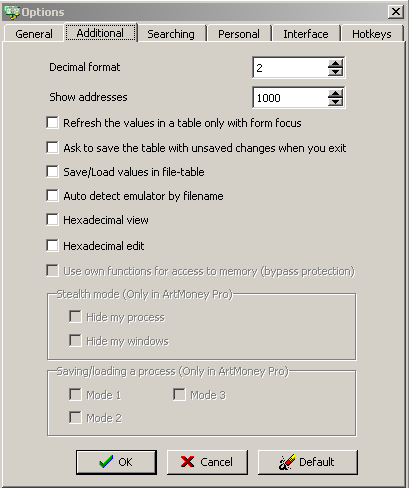
This is how I set my "General" settings tab (which is the only tab you really need to modify). The "Refresh time" and "Freeze time" parameters are set up this way so the data updates on-screen as fast as possible.
In addition, I have disabled "Refresh the values in a table only with form focus", so I can look at the data while I'm controlling the emulator or game in question.
Search
Once you have a basic process selected, you have two options, "Search" or "Filter". "Search" should be the first step.
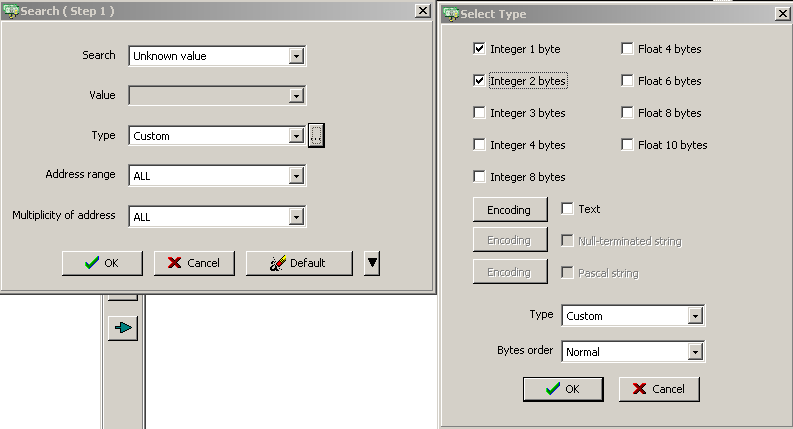
While searching for values, you can choose between "Unknown value", "Known value" and "Range of values", among other options. These three are the most important.
- "Unknown value" is used when you have no idea what the data you are looking for actually is. This is probably the one you'll be using the most.
- "Known value" is used when you are absolutely certain of one value in the game, such as a certain velocity, power value or a graphical asset. This option is very useful in several tricks (which I will cover in a bit).
- "Range of values" is used when you have an estimate of the data you are looking for, e.g., if a velocity seems to be between values "A" and "B". This helps to narrow down searches.
I prefer to use a "Custom" search myself, since the type of data I need tends to behave the same.
In this case, my "Custom" selection varies between "Integer 1 byte", "Integer 2 bytes" and "Integer 4 bytes".
- "Integer 1 byte" is usually used for very simple counters, such as timers or combo counters.
- "Integer 2 bytes" is usually used for player data, such as life, velocity and position, among other things. Keep in mind that with these types of addresses, the integer and float values are usually kept in two different addresses (which are usually close to each other in memory). When working with floats, the value displayed in ArtMoney is the hexadecimal conversion of the number; to obtain the float in decimal, you must divide it by 65536.
- "Integer 4 bytes" is used for newer games. This type of address usually stores the integer and float in a single address.
After performing a search, your screen should look kinda like this:
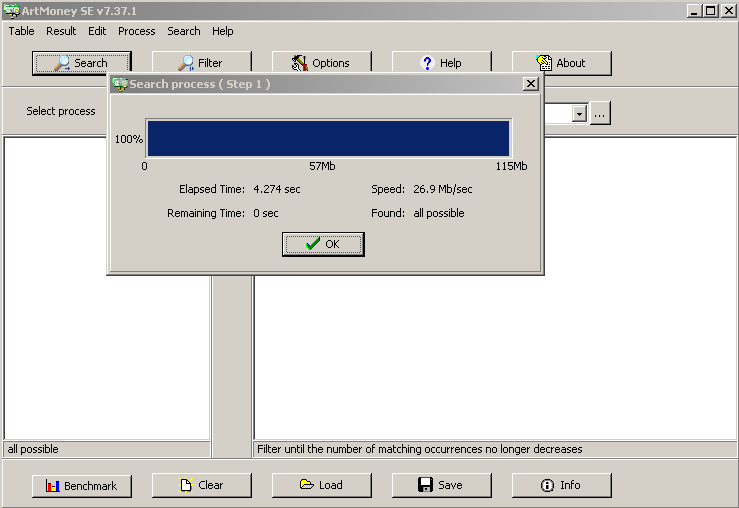
It might look like ArtMoney did nothing, but do notice the "all possible" displayed at the bottom of the left sub-window. This is ArtMoney telling you it has a ton of addresses ready for you to look at. In order to actually work with them, you need to filter the data to obtain something useful.
Filter
So now we go ahead and click the "Filter" sub-menu:
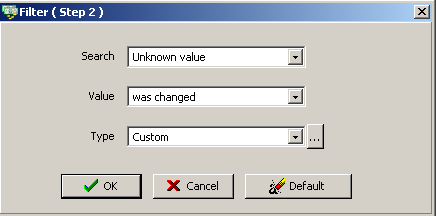
This is the most crucial step of all. This prompt acts just like the "Search" one we used before, except this time it will delete the addresses that do not match your "filter" criteria.
As you filter, the address list you obtained previously will become smaller and smaller until you obtain something that can be worked with.
The most useful filter options are "Was decreased", "Was increased", "Was not changed" and "Was changed".
My usual filter process involves moving the object I want to analyze frame by frame, and then abusing the filter options mentioned previously. Keep in mind that even a static object will narrow down the list a lot using the "Was not changed" filter.
Filtering is all about observation: if you move an object to the "right" then the position address should either increase or decrease as you keep moving, for example. Just remember that what happens on-screen will give you hints as to how you should filter.
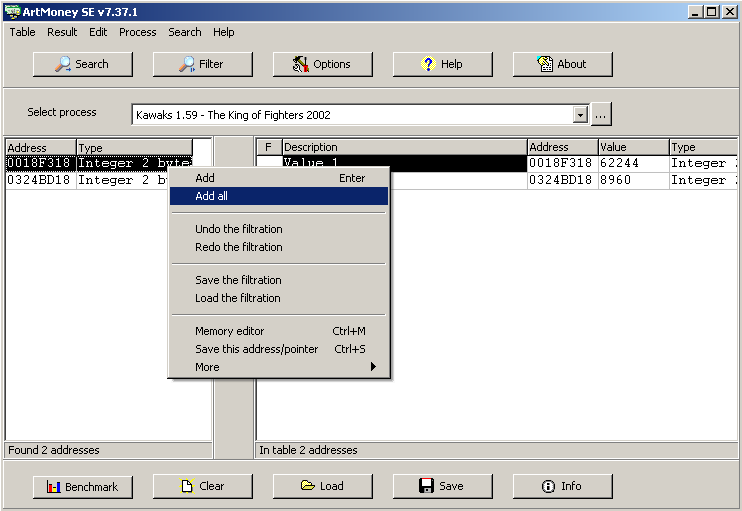
After filtering and obtaining a small list of values (such as the one on the right), you may add them to your "table" (the list on the left) in order to analyze them further.
Once you have values on your "table", you may freeze them, modify them and even label them. Freezing the values and then checking the game will tell you if you found the correct addresses for the data you wanted (freezing a possible position address should also freeze the character in-game, for example).
Just keep in mind, some complex games may just reflect the data, and freezing via ArtMoney may have no effect. Don't worry too much about this, it doesn't happen very often and experience will help you determine if the addresses you obtained were correct or not.
These are the very basics behind using ArtMoney. Go ahead and mess around with it, see what you find!
For now, we will be moving on to very useful tricks for obtaining data from games.
Trick #1. Using blocks to your advantage.
The most common trick I use. First of all, find an easy address for the player you want to check (e.g. player 1); this should be a quick process using the usual filtering methods. An example of this would be a "position address".
Once you have it, then it's time to cheat: pause the game and copy the memory address of the value you've found. Then initiate an "unknown search" but tell ArtMoney to search in addresses very close to the one you had before (you can select the starting and ending points using the "custom" menu).
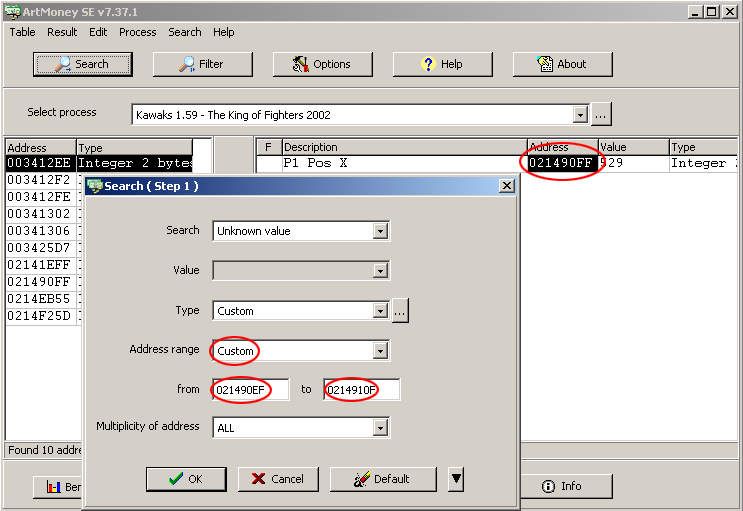
After the search is done, just filter for "Was not changed" while the game is still paused. Since the character is frozen, the filter will return every address contained in the interval you specified. After that you should be able to add these to your watch list and remove the ones you don't need.
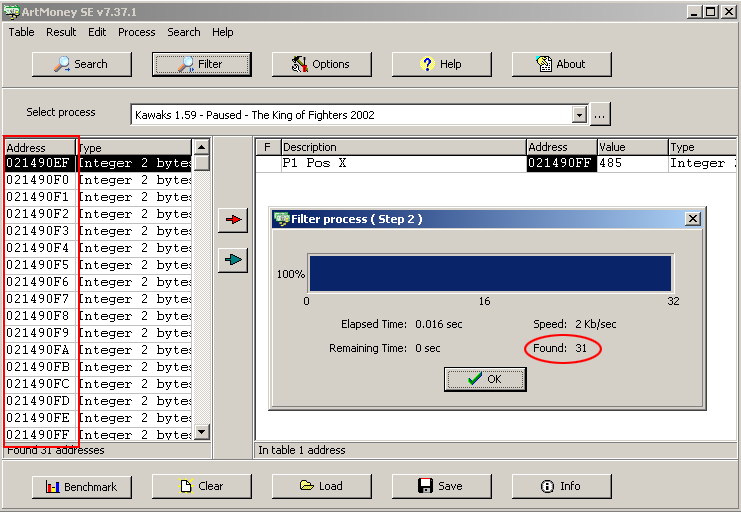
Games such as KOF and CvS2 keep player data in blocks. Using this technique, you can find interesting values as well, such as player scale (CvS2) or maybe player sprite number (KOF).
Depending on the game, this could make hacking it a breeze.
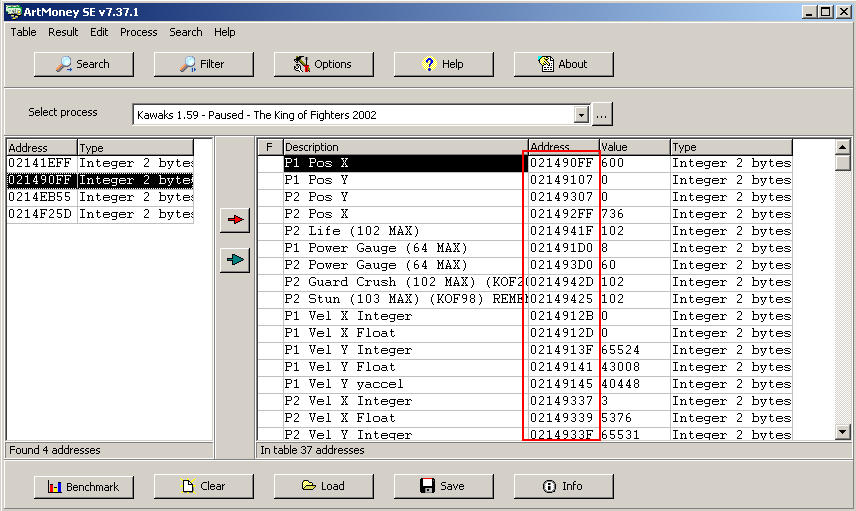
Note: Remember that most games keep float values for position. This is especially useful if the velocity value was not in the memory chunk you analyzed, since you can use them to calculate a constant velocity. This comes in handy for Trick #2.
Trick #2. The half-known search.
Let's say you've managed to obtain position data, but the velocities are not stored in the same block. This is where you use data to your advantage. Record your current position (int and float, if available!), and then advance one frame while walking forward to obtain a new position.
If you have both int and float values for position, then the difference between your current position and the previous one will be the walking velocity! Since you now know the walking velocity, you can do a search for a known value and find it! Sweet.
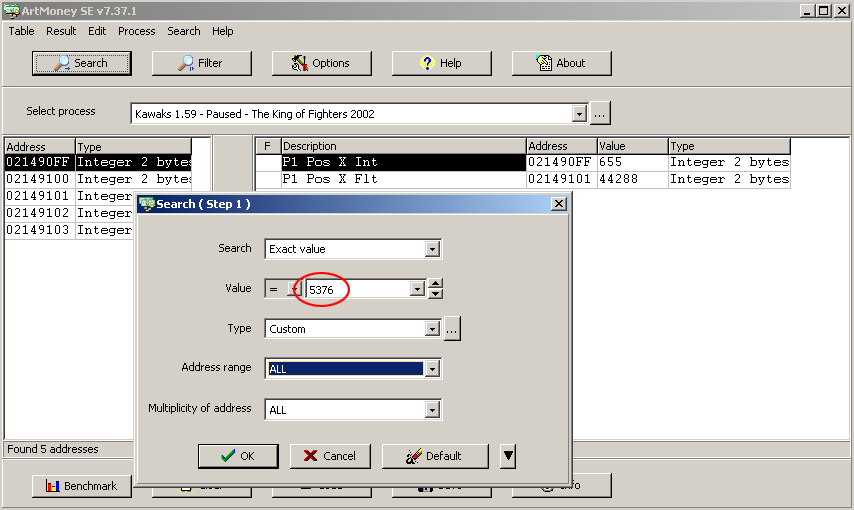
There are some exceptions though. JoJo's Bizarre Adventure for example lives up to its name by doing neither of these things, no memory blocks and no walking vels. For games like JoJo you will need a different type of trick.
Trick #3. In-depth data analysis.
By now you are probably familiar with the filtering options. Out of all of them, "Was increased" and "Was decreased" are the best. If you are stuck trying to find data such as velocities, then it's time to filter your way through!
Find a move or an action that causes an obvious steady decrease of whatever you are trying to get (velocity, life, power, damage). Now it's filtering time! Search for an unknown value and filter for "Was decreased" in every frame that appears to have this behavior.
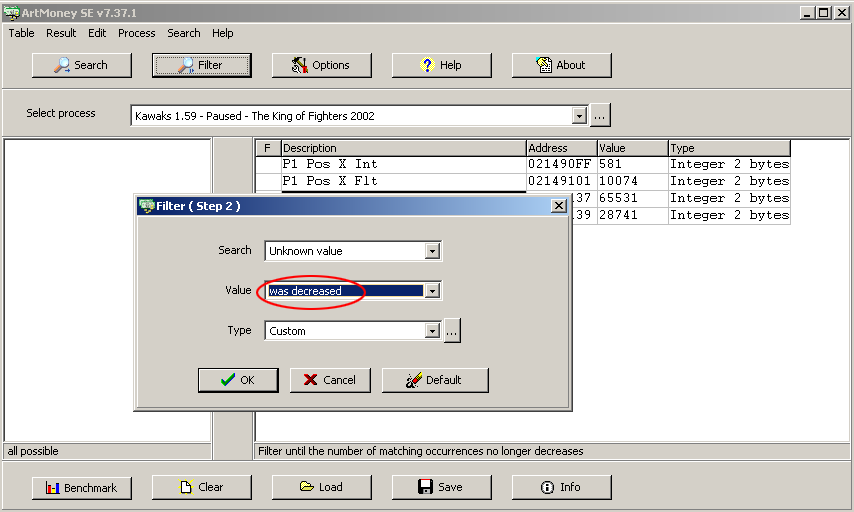
You can obtain velocities for games such as JoJo this way. Just remember: not every game uses friction or acceleration/deceleration, be careful!
Trick #4. Abuse data re-hashing.
If you happen to have a table for an older game and want data from a newer entry in the franchise, then find *something* they totally copied over; usually a character will work just fine. Be it walk vels, counters or even special effects, nothing beats a search for something you already know.
I was able to obtain data from KOF XI using this method. SNK never changed the basic walking velocities from their Neo Geo games!
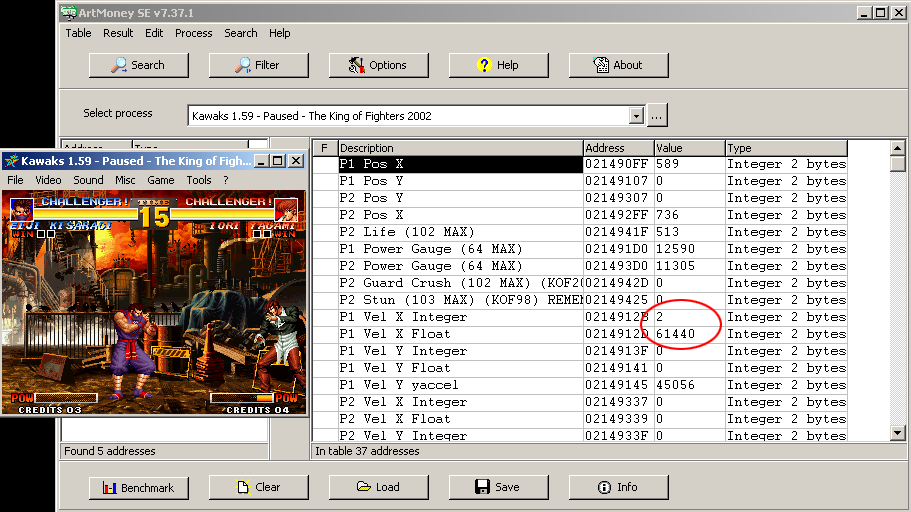
In the best-case scenario, you may even find games that use the same engine! (Fun fact: it was Jesuszilla leaving ArtMoney open while switching KOF games that led to the discovery that they all used the same engine from 1994 to 2002.)
Practice
These should help you get through many games easily, but there's one more trick and it's probably the most important one: Practice!
No guide can give you the experience and intuition you'll gain by practicing. When a game gets really tricky, cracking it comes down to you and your experience. But once you have enough practice, you'll even be able to read floats in hexadecimal format, such as 32768, which is 0.5 (and yes, I just wrote this without even checking!).
I know this might seem really trivial to some people, especially those that already use ArtMoney regularly, but I believe these methods had to be documented in one way or another. Many of these tricks are not mentioned, or are assumed to be known by most people, but in truth, I had to learn a lot of this all by myself.
Having this as a starting point is a very big leap from starting empty-handed, and it should clear up a lot of the things that made ArtMoney seem too complicated to learn. If I can use ArtMoney, so can you!
Until next time!
~Vans