NOTES
Cornerpush and you — An introduction
This short article came about after a fellow forum member asked me why proper cornerpush was important and how it was handled in commercial games.
I wrote this article to give some insight both to MUGEN coders looking to get a better understanding of cornerpush and to casual readers who want to know more about how cornerpush works in their beloved fighting games. To this end, the article includes references to the MUGEN engine, but even if you are not interested in MUGEN at all, it is still a good read and a good reference for understanding the importance of cornerpush and how it relates to the way games handle hits.
By the end of this article we will have learned what the fundamental rules of cornerpush are and why "breaking" them is a bad idea. For this, MUGEN serves as an excellent example.
This is a list of jargon that I may be using here:
- "Hitstun": This describes the small window of time where the game "pauses" right after registering a collision between two characters. Hitstun is commonly used to allow the player to input additional follow-up moves to create chain combos.
- "Constants": This refers to a set of numbers defined for every character in MUGEN that modify the way the character is affected by velocities, such as the ones received after getting hit. These constants are what make a "heavy" character feel slower than a "lighter" one; compare, for example, Zangief to Cammy from the Street Fighter series.
- "Hitstun timings (notation)": Commonly referred to as "pausetimes" in the MUGEN engine. The notation X,Y is defined as follows: X marks the hitstun frames P1 receives after connecting with an attack, and similarly, Y marks the hitstun frames P2 receives after getting hit by an attack.
- "Advantage frames": A common fighting game term that refers to the difference between the number of frames it takes P1 to return to their idle state after a move and the number of frames it takes P2 to go idle after getting hit. For example, if character X punches character Y, and character X returns to their idle state after 24 total game frames while character Y returns to their neutral state after 32 total game frames, then character X has an "8 frame advantage" over character Y.
- "Hit velocity": This refers to the velocity an opponent receives after getting hit by a move.
- "Gethit state": This refers to the action a character performs after getting hit by a move, represented visually by a "hurting" animation. The player has no control over their character during this state.
- "Slide time": This refers to the number of frames a character moves for during a gethit state. If character Y gets hit by a move from character X and is affected by hit velocity for M frames, then the slide time for that particular hit is said to be M.
Ah, cornerpush. It's kind of an issue in MUGEN because it never had a proper cornerpush system to begin with.
I'll try to explain it as best I can.
Cornerpush was basically created to nerf the pressure of being locked down in a corner, creating an almost "corner-less" environment, per se. It's supposed to act the same way regular hits do: you hit someone and they get pushed back when their hitstun is over. In the corner, if you hit someone, you are the one who gets pushed back once their hitstun is over.
Commercial games use the most logical solution to cornerpush: the same amount of force you'd cause the opponent is cast onto you in the corner, as long as no special exceptions are in play at the same time (for example, most games will reset a cornerpush if the opponent gets hit by an outside object; more on this in a bit).
MUGEN's, however, doesn't follow any of this at all.
1. The way cornerpush is defined in MUGEN depends a lot on the friction constants defined within the characters themselves.
For example, using Terry_WLS:


There is a total difference of 14 pixels between the two punches, which is a huge disparity that creates a whole different combo game in the corner. This is terrible. Keep in mind, this was tested against an opponent with "ideal" friction. If we test it with someone like CvS Sieger...


This has a total difference of 23 pixels! Almost twice as much as in our previous case. With opponents like him the combos are going to be completely different, and since cornerpush stacks up over each hit, the errors keep growing. It's all due to MUGEN not using the constants properly: all the mid-screen velocities are calculated using your opponent's friction constant, while the cornerpush is calculated using yours. This is a huge problem.
2. MUGEN never applies cornerpush at the right time.
This is probably my favorite example to explain how bad MUGEN's cornerpush is and how important it is to have a proper system for it.
Terry has a special command move in KOF2003 called "Combination Blow", which is a follow up to his close fierce basic.
It all sounds okay so far, but the thing is, KOF plays with the hitstun timings for close fierce in order for that second hit to connect properly. Instead of having the usual 12,13 hitstun it uses an unconventional 6,13 hitstun (half!) in order to give Terry enough advantage frames to have the follow up connect.
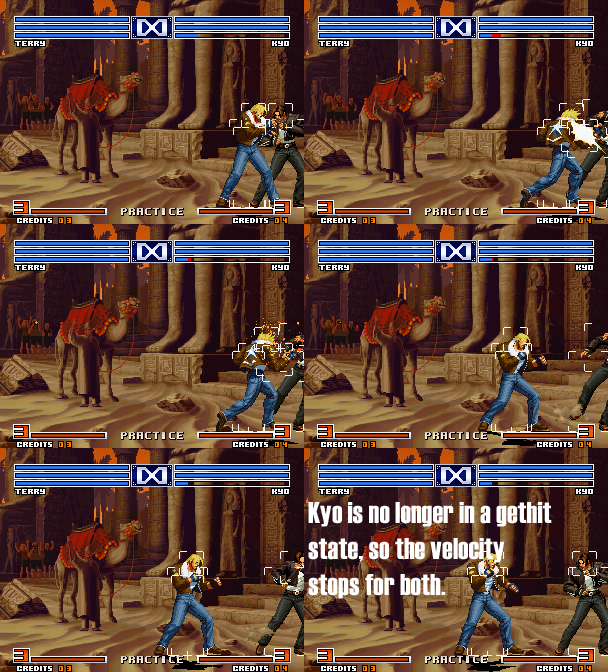
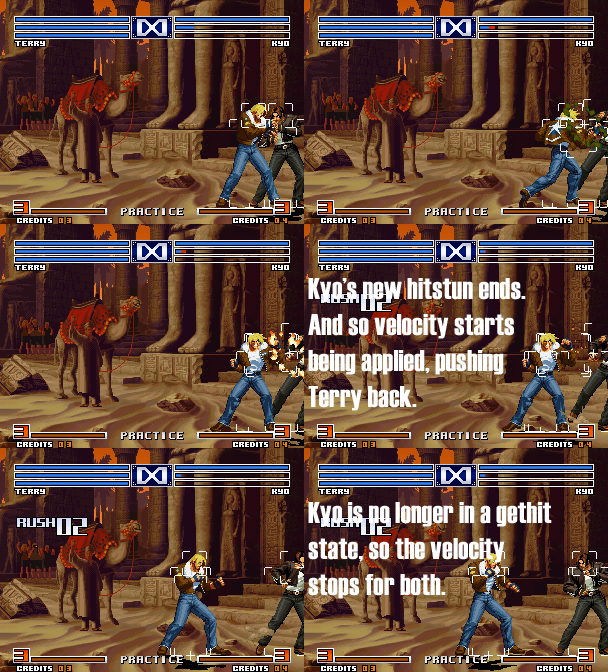
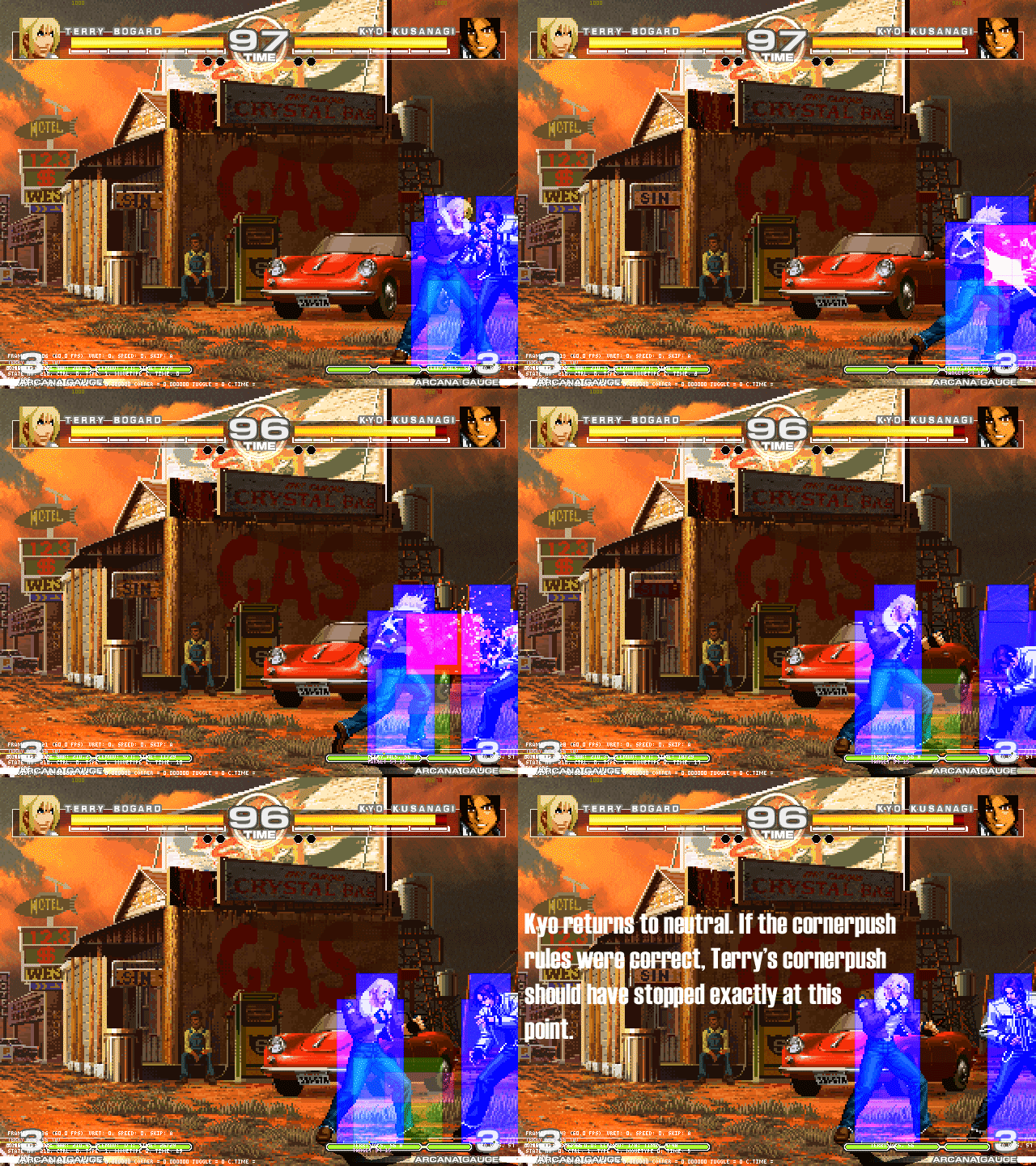
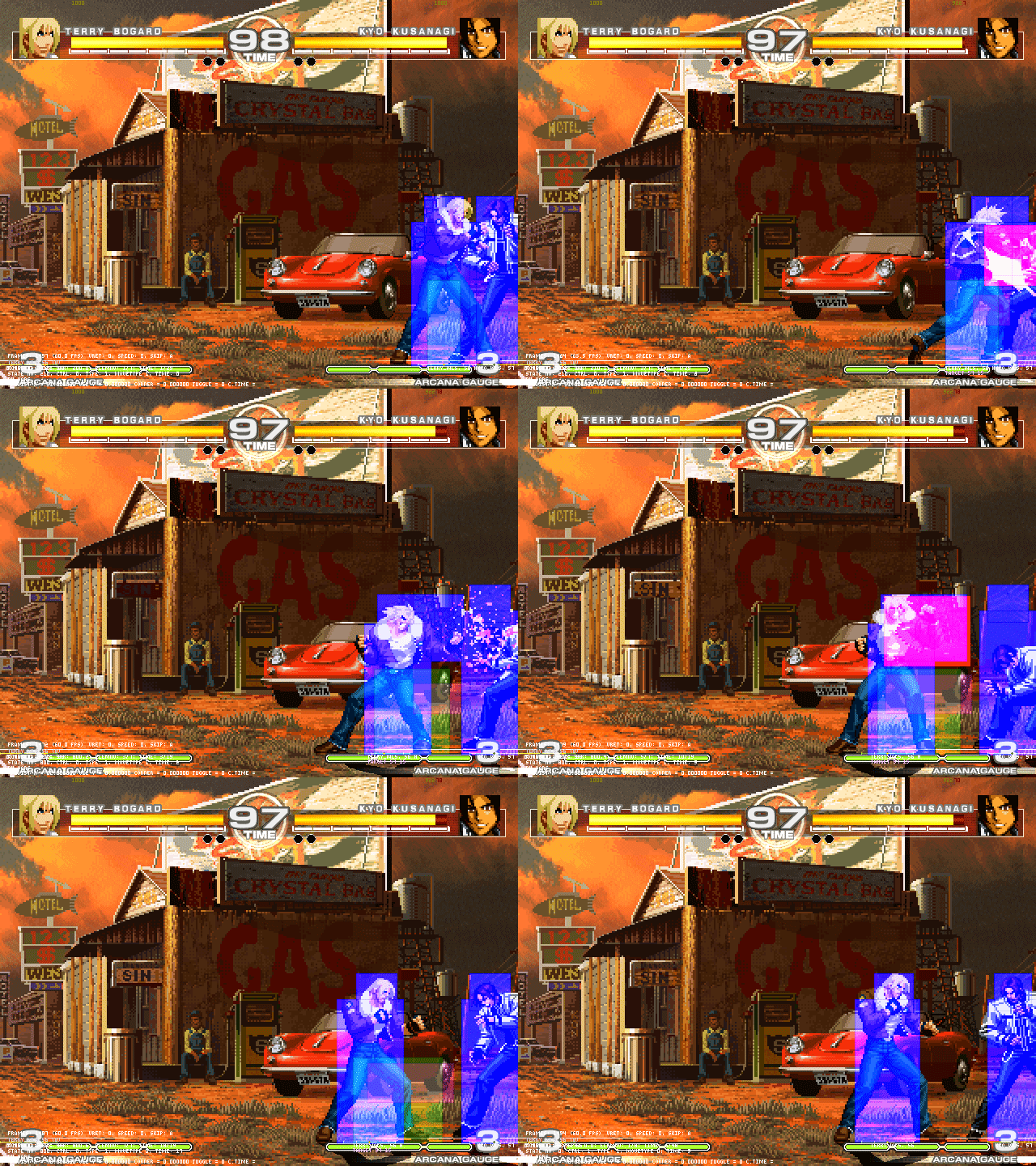
Terrible, isn't it? This problem is what made me switch to custom cornerpush. :P
This should also make it easier to figure out what the real special rules for cornerpush should be!
- Cornerpush is applied when, and ONLY when, your opponent's hitstun ends. That is, you get pushed if your opponent is being pushed, plain and simple.
- Cornerpush should alter your position in exactly the same way your attack alters your opponent's position. That means that if your opponent was moved X pixels, then you should be moved that exact amount as well, no exceptions.
- Cornerpush should only end at the exact same time your opponent stops being pushed back.
And a very special (and important) rule:
- Cornerpush is only applied to you if the last hit to connect with the opponent was made by your character directly. What this means is that whenever a pet, a projectile or an assist hits the opponent while you're being pushed back, you no longer "own" that hit. Since you no longer own the hit, you will not be pushed back any further until you hit the opponent directly again.
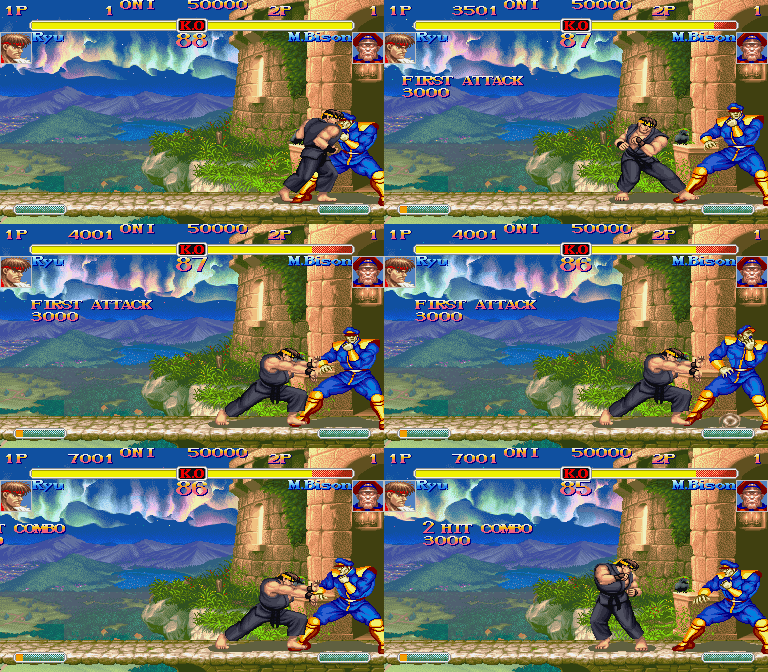
Those are the rules every game follows to the letter. Without them, combos would be completely chaotic in any game.
It's also worth mentioning that some games introduce extra rules, like allowing a character to be pushed during air-to-ground interaction (Capcom vs. SNK 2) or even air-to-air interaction (BlazBlue), but in the end the theory behind it always follows those rules.
My solution for MUGEN
My cornerpush system for MUGEN doesn't fix the problem as a whole, because every character has a different friction constant, which will always make mid-screen combos different with every character. What I did was fix the corner side of the problem by defining every cornerpush velocity myself (this means the opponent's velocity is irrelevant to my calculations; I use whatever I defined in my HitDef instead).
This means every combo you create in the corner will work against different opponents, unless it relies on heavy collision box tricks. At least one part of it is consistent now!
My solution DOES, however, fix all of the other problems the original one had, by applying the cornerpush at the proper moments and ending it appropriately. My system would also work for recreating any cornerpush system in existence by simply adding the extra rules required, and I've also heard of extremely good results from using it as-is with the same type of calculations.
It all depends on what you want. You could modify my system to use the exact same vels the opponent is getting, or just use the same method I use to calculate friction; either of those solutions would already make your work feel better by a significant margin. What I also like about mine is that I made it as user-friendly as possible, and I have already taken care of all the possible bugs it could cause, so I can definitely vouch for it.
In any case, I hope this helps you understand cornerpush a little better.
If you have any more questions feel free to drop me a line.
Until next time!
~ Vans